Berlins Today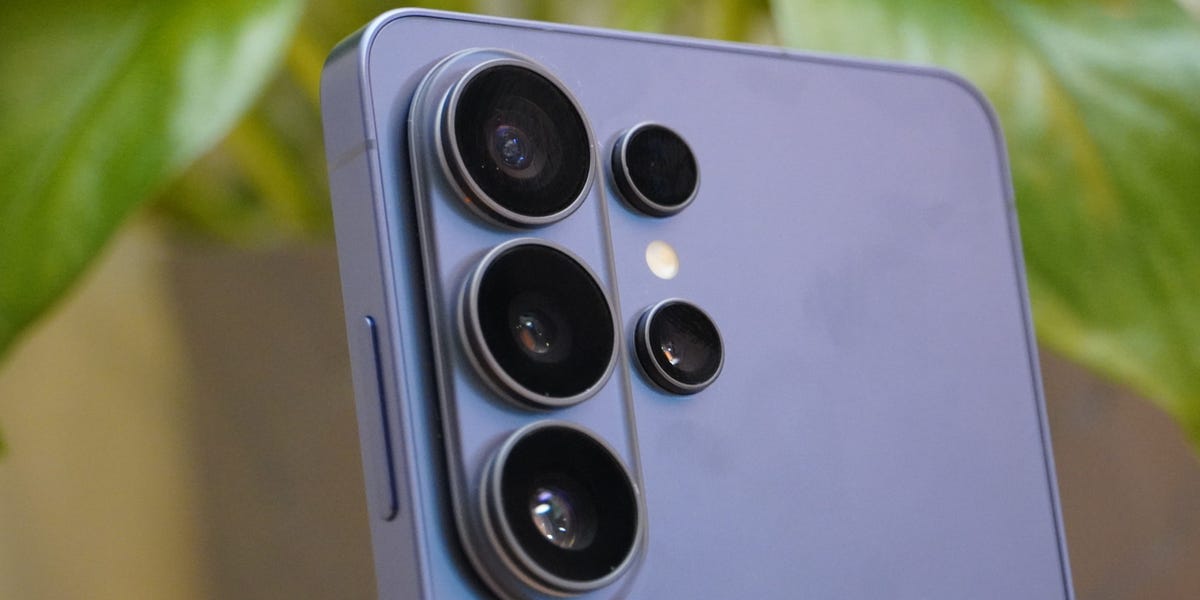
Business Insider The S26 Ultra still offers the best cameras on a Samsung, even over the pricier Z Fold 8 Ultra. Mark Knapp / Business Insider From the early days of Android, Samsung has stood out as a leader of the pack, and over the last few years, the Ultra tier of Samsung's flagship Galaxy S line has served as a high bar for the rest of the market. The Samsung Galaxy S26 Ultra is the latest phone to fill that role, and it's little surprise that it's bringing a lot to the table.
The S26 Ultra naturally packs the latest high-end Qualcomm Snapdragon 8 Elite Gen 5 chip for extreme speeds that'll hold up for years to come. It has a robust camera system that can rival the rest of the market. And for 2026, it naturally has a lot of AI features trying to find practical ways to fit into our lives.
Samsung may not be innovating much in the phone's design, leaving it a tame-looking device with little to differentiate it from prior models, but it's still an all-around great phone with a little room for improvement here and there and hardly any major shortcomings. It comes at a high price, starting at $1,399 (it was $1,299 before a post-release price increase), so it won't be for everyone. If you know you're after a phone that goes hard at every turn, though, it's well worth a look.
Samsung Galaxy S26 Ultra The S26 Ultra gives you high-end quality at every turn. It may not be the very best at everything, but comes out swinging such that it might be in the top three in just about any category you want to consider. This makes for an excellent all-arounder, though that naturally comes with a high price - until it lands in a great sale that is.
Specification Details Starting price $1,399/ £1,360 / €1,550 Colors Silver Shadow, Pink Gold, Cobalt Violet, Sky Blue, White, Black Release date March 11, 2026 Durability rating IP68 Display 6.9-inch OLED Resolution 1440 × 3120 Refresh rate 1-120Hz Peak brightness 2,600 nits Processor Qualcomm Snapdragon 8 Elite Gen 5 RAM 12GB/16GB (1TB model only) Storage 256GB/512GB/1TB Rear cameras 200MP Main - ƒ/1.4, 85° FOV 50MP Ultrawide - ƒ/1.9, 120° FOV 10MP 3x Telephoto - ƒ/2.4, 36° FOV 50MP 5x Periscope Telephoto - ƒ/2.9, 22° FOV Selfie cameras 12MP Dual Pixel selfie camera - ƒ/2.2, 85° FOV Camera zoom Up to 100x Space Zoom (3x and 5x optical zoom) Video Up to 8K at 24/30 FPS or 4K at 30/60/120 FPS Battery capacity 5,000mAh Claimed battery life Up to 31 hours of video playback Wired charging 60W Wireless charging 25W Dimensions 6.44 x 3.07 x 0.31 inches Weight 7.55 ounces (214g) Connectivity 5G, Wi-Fi 7, Bluetooth 6.0, USB 3.2 Gen 1 SIM support Nano-SIM, eSIM (max 2 at a time) (dual-SIM for international models) Operating system Android 16 Software support period 7 years (2033) Biometrics Ultrasonic in-display fingerprint and Face Unlock Classic Samsung design or irritable table wobble? Both. It's both.
Mark Knapp / Business Insider Design: Tame looks made thinner and lighter, but a bit too wide Since the Samsung Galaxy S22 Ultra, Samsung has been rocking a very similar design for its Ultra line with minor aesthetic and material changes but a signature look that has remained fairly constant. Curiously, Samsung has switched back to an aluminum frame after making such a fuss about titanium in the last two generations. Still, the S26 Ultra may be a high point for what the design accomplishes, since it is particularly thin and light for the series, measuring just 7.9mm thick (minus the cameras) and weighing 7.55 ounces all while squeezing in a 6.9-inch display.
This makes it the thinnest and lightest Ultra model. Thin for a flagship beast, but chunky compared to the unfolded Z Fold 8 phones. Mark Knapp / Business Insider Samsung has gone wider than the S25 Ultra, though, and I find the phone's width just a little beyond comfortable.
The flat edges are fine, and the rounded corners are more comfortable to hold than the sharper angles of some earlier models. But ultimately, the S26 Ultra is just a lot to try holding onto. I have large hands, and I struggle to get a secure grip on the phone for one-handed use.
To move my thumb around on the display, I inevitably have to let my other fingers slip away from the far edge of the phone and hold just the back. This makes wielding the phone more a game of balance than of grip. I haven't dropped it yet, but it's only a matter of time.
Durability hasn't been perfected on this model. The phone carries the same IP68 dust and ingress protection that Samsung has offered for years, and that should be enough protection for most people as far as dust ingress and dunks into water are concerned. The front may use special, extra-durable Corning Gorilla Armor 2, but the rear Gorilla Glass Victus 2 is a different matter.
Somehow, within a few days of testing and with the phone very specifically not stored in a pocket with my keys, it still managed to scrape up on something, leaving considerable marks on the rear. The damage appears superficial, not leaving deep grooves that I could feel with my fingers, but it's unsightly nonetheless. Given the drop risk, low scratch resistance, and the price of this phone, you should certainly consider the best Samsung Galaxy S26 Ultra cases guide to protect your investment.
While not as noticeable at a distance, the easy-to-scratch rear glass makes a phone case an essential additional purchase. Mark Knapp / Business Insider In terms of style, the biggest shift in looks is the new colors and updated design of the rear camera array. Samsung suggests "The new ambient island camera design flows seamlessly into the rest of the device for a refined finish," in regard to the rear cameras, and the clear glass aesthetic gives a hint of that vibe, but the fact is that the three largest cameras sit on a raised platform that is far from seamless.
For one thing, it will collect dust around it. The seam also presents opportunities for hairs to slip in and get thoroughly stuck — ask me how I know. At the bottom edge of the phone, you'll find a SIM card tray, which is, frankly, nice to see on a flagship phone in 2026, since Google and Apple have decided to go all in on eSIM.
International models of the S26 Ultra even get dual-SIM trays and eSIM support, while the US model is annoyingly limited to a single physical SIM (plus eSIM). Samsung retains the S Pen for another year, slotting it into the bottom left corner. This stylus offers more precise input on the display than fingertips can.
It makes for nice doodling, handwriting, or highlighting documents, but because it's such a small pen, extensive use will likely have your hand cramping in short order. The Ultra series sticks with the S Pen stylus, but perhaps it's about time it was integrated with the bigger Z Fold series? Mark Knapp / Business Insider The USB-C port on the bottom of the S26 Ultra supports up to 60-watt wired charging.
It's not as fast as some rivals, such as the OnePlus 15, but OnePlus has recently exited the US market, leaving Samsung with little competition. Perhaps the bigger feature of that USB port is Samsung's continued support for DeX, which lets the S26 Ultra act like a little desktop computer, outputting visual data to a connected display. This is a convenient way to greatly extend the phone's utility.
Though you can use the display as a trackpad, the phone's wobbliness when it's resting on its back will likely prompt you to grab a proper mouse for this use. As with previous models, the S26 Ultra features facial recognition and a fingerprint scanner built into the display for biometric unlocking. Both work quickly, and the fingerprint scanner even registered my thumb even with a bit of water on it.
The fingerprint wasn't amazingly consistent, though. It worked most of the time, but I found myself trying more than once quite a few times throughout my testing period. You won't find better gaming performance on a Samsung than the S26 Ultra.
Mark Knapp / Business Insider Performance: Ample power, but not fully tamed The S26 Ultra offers brilliant performance for everyday operation and modern gaming alike. It gets plenty of speed out of its Snapdragon 8 Elite Gen 5 chip. Running a demanding game like Neverness to Everness at its max Cinematic quality preset at a stable 60fps was no problem for the S26 Ultra.
It could sustain that 60fps throughout an hourlong session and showed very few issues with sudden framerate drops or hitching. Even after that hour of gaming in this mode, the phone was warm but not hot to hold, with a hot spot of 106.3 degrees Fahrenheit but generally falling below 100 degrees on the surface. The battery didn't take too bad a hit either.
After about 90 minutes, the game had only used about 24% of the battery. Of course, screen brightness could affect how much the phone drains. All of this speed is overkill for everyday use.
Navigating apps, switching back and forth between apps to multitask, and browsing the web is all fast and fluid. And with plenty of performance in reserve, the phone will likely continue to feel that fast for years to come. All that said, future games that push the phone harder may start to see it reach its limits.
In more extreme and extended testing, I watched the phone's performance sink by as much as 45% due to thermal throttling over 20 minutes. This is not uncommon for phones, even expensive, high-performance models. Some devices use more advanced cooling techniques to keep heat at bay, such as the latest RedMagic gaming phones, which could leave the S26 Ultra lagging in the future.
Thankfully, for now, the S26 Ultra has more than enough speed. If you're looking for personality on the S26 Ultra's looks, we'd suggest buying a case. Mark Knapp / Business Insider All the extra performance doesn't come at the cost of the battery, though.
The phone happily runs all day, even during heavy use, without fully depleting the battery. A few hours of streaming, an hour of gaming, and regular use throughout the day will have you wanting to charge at the end of the day, but if you leave the gaming out and don't stream so heavily, two or even three days (for lighter mobile users) of runtime is within reason. With a long runtime, it's easy to forget to charge.
Fortunately, when the battery is getting low and you need to top up, the phone recharges fairly quickly. One morning, when I realized the phone was at just 16% charge, I plugged it into a fast charger, and in 15 minutes I was back up to 55%. Given the phone's efficiency, that would be enough to get me through a typical day of use comfortably.
It's worth noting that the S26 Ultra still has just a 5,000mAh battery despite being a fairly large phone. Samsung didn't make the leap to silicon-carbon batteries for this model, which would have offered greater capacity, but charging speed was boosted from 45W to 60W. This year's Samsung Galaxy Z Fold 8 Ultra , base Fold 8, and Flip 8 models did get silicon-carbon batteries, giving them a bump in capacity.
For comparison, the OnePlus 15 isn't far from the S26 Ultra in size, but it packs a 7,300mAh silicon-carbon battery. We're hoping the S27 Ultra will get the upgraded battery tech as well. The iPhone 18 Pro models also skipped silicon-carbon batteries, but capacity was increased to 5,567 mAh on the iPhone 18 Pro Max in the US. 2,600-nit brightness lags behind the 3,600-nit brightness offered by the newer Pixel 11 Pro but is plenty bright unless the sun is really bearing down on it.
Mark Knapp / Business Insider Display: Largely great with a privacy twist Samsung has a history of delivering some of the best displays on the market, and that goes for its TVs, laptops, monitors, tablets, and (of course) phones. The S26 Ultra is no exception, but Samsung's choice to focus on privacy may make it a little less exciting for some than the previous generation. It's a sharp and splendid OLED display with a max refresh rate of 120Hz that can make scrolling content look silky smooth.
Swiping around on the phone is fluid, and animations between apps and pages have zero stutter. That 120Hz refresh rate won't come into play in many games, but for those that support it, it will be beneficial. The panel's vibrant color and deep contrast make video content look exceptional.
And at 6.9 inches, it's a decent platform for enjoying content. The display can get plenty bright for outdoor use even in sunny conditions, though you still won't want to get direct glare from the sun. The display may have a 1440x3120 resolution, but Samsung defaults to running it at a lower 1080x2340 resolution to conserve battery.
If you need every pixel for very close-up use or pixel-perfect content creation, you may want to switch to the higher resolution, but in day-to-day use, the lower resolution is still exceedingly crisp at regular viewing distances. And unlike some earlier Samsung flagship phones, you don't have to trade off resolution for motion clarity. The display can run at its full 120Hz for smooth scrolling and motion even at its highest resolution.
The phone will automatically lower its refresh rate to conserve energy when fast motion isn't needed, then ramp right back up to 120Hz when it detects actions that benefit from it, like scrolling a webpage. It's worth diving into the settings to get the display to your liking. Mark Knapp / Business Insider The speakers on the S26 Ultra get quite loud, making them a solid match for the display.
If you're watching movies or playing games and want sound effects to blast out, they'll do the job. I found full volume uncomfortably loud at arm's length, but that extra volume can be good for listening to podcasts in the shower. Samsung's Galaxy S25 Ultra model had a special anti-glare display.
This year, it still has anti-glare properties but instead focuses on a unique 'Privacy Display' that can, on command or automatically, shift how pixels are presented so that off-angle viewing becomes much harder while leaving direct viewing largely unchanged. It's a neat trick, and it certainly reduces visibility at off-angles by largely dimming the screen's appearance. Would-be peepers have to be pretty far off-axis before it gets hard to see, though.
Someone looming over your shoulder just 30 degrees off-axis wouldn't have much trouble seeing. It's certainly a benefit compared to no privacy protection at all, but it could provide a false sense of security. Privacy Display mode is still quite visible depending on the angle.
Mark Knapp / Business Insider But once you go too far, it works much better. Mark Knapp / Business Insider There's a deeper privacy mode that, instead of dimming the screen for off-axis viewers, washes it out with extra light. This leaves the screen appearing gray, and it's a bit more effective.
The downside is that it also hinders the look of the screen for normal viewing. Since extra light is coming out of the display, nothing appears truly black. So, instead of looking like the gorgeous OLED display that it is, it ends up looking like a pretty poor-contrast LCD screen.
Fortunately, the tool isn't all-or-nothing. You can set it to come on automatically for certain scenarios and remain off otherwise. The settings let you enable it on a per-app basis, when inputting a PIN or password, or for pop-up notifications (but not the notification shade, oddly).
It's worth noting that the tool can't detect when you're putting in passwords on websites or in apps. It only activates when you're entering system-level passwords (think: your PIN, pattern lock, or phone unlock password). Samsung includes a shortcut to the privacy display's settings in the Quick Settings panel, making it easier to use at will.
On-device AI features on phones still seem to be looking for their killer app. Mark Knapp / Business Insider AI features: Plenty of features, questionable utility As with every piece of hardware launching these days, AI features heavily in the S26 Ultra. You can find it in every nook and cranny of the phone, whether it's AI that generates text transcriptions of calls, answers calls from suspicious unknown callers, summarizes articles and text messages, or translates conversation on the fly, Samsung has it built in.
Many of the features only work when you're using Samsung's first-party apps, such as the browser. This limits their utility and provides Samsung an opportunity for lock-in. Perhaps Samsung's most useful and straightforward AI feature is Bixby.
It continues to offer simple support that's aware of the phone itself. This makes it easy to find or adjust settings on the phone with a quick query to Bixby. The Bixby app can also tap into Perplexity AI for broader queries that don't pertain to the phone itself.
Samsung naturally has a host of image tools, letting you modify photos you've taken, convert photos or sketches into AI-reimagined "art", or generate imagery from plain text. These tools are hardly unique to Samsung, but having them built right into the phone makes them easy to use. The results can be fairly impressive, too.
I asked the phone to change the sky in one of my photos to look stormy, and it did so convincingly. Let's add some stormy clouds to this scene. Mark Knapp / Business Insider Results are far from instantaneous, but this is still a free feature (we wouldn't pay for this).
Mark Knapp / Business Insider Not bad, Samsung. Not bad at all. Mark Knapp / Business Insider While trying to generate images from text, I felt like I was wrestling with the tool more than anything.
Going from a photo to an AI-altered picture was a bit more direct, but it would still do odd things, like giving me hair (I'm bald) or changing the background entirely. One demo Samsung showed off at its launch even had a person using a photo of their dog to add it into another photo they'd taken. I did the same thing, using a photo of my cat to add him into a selfie I'd taken elsewhere.
The tool added a cat to my shoulders fairly convincingly, even making it orange, but it was clearly a made-up cat, not my cat. One AI feature that is thrust upon you is the Now Brief. This attempts to keep you up to speed on important matters relevant to your day.
Google once rolled out a similar feature and then rolled it back. In my brief testing of the Now Brief, which really wants deep access to my personal data, I find it basically worthless. With the limited access it had, it wanted to present random tabloid news (which I had no interest in), YouTube video recommendations (which I didn't need), route recommendations (I have no commute), and a weather forecast for the day (for Washington, D.C., despite the phone having my location elsewhere.
This was evidently because Now Brief, despite having location access, just pulls data from the stock weather app's default location, which I hadn't set up or granted any permissions. How's that for smart AI? All of this is basically the kind of thing each of these respective apps would present me if I just opened them one by one.
I can see how it might be useful to get them all in one place, but it's also just a potential mess of irrelevant information if you're looking for a single data point. I don't need a YouTube video recommendation if I'm, say, rushing through the airport and hoping the Now Brief will show me my boarding info. There's still more AI to be had with Gemini.
It's the default AI assistant here and on plenty of other Android phones, so it's far from a unique aspect of the S26 Ultra. It's useful at times, but I find it hit-or-miss. I asked it to play a specific podcast, and it simply pulled up one that had one word in common with the name.
I asked it to adjust a display setting three times, and it did as follows: did nothing once, took me to the appropriate settings page once but took no action, and claimed to adjust the setting on its own but actually didn't. I won't say AI features like these can't be useful or fun, but I have found little utility in them and haven't seen the S26 Ultra offer any outstanding capabilities beyond what other phones already provide or that I can't access through third-party apps. Too many features simply remain too fussy or unreliable.
Cameras: A robust, capable shooter The Ultra line is where Samsung flexes its camera muscles, and the S26 Ultra is no exception. It has a robust array of sensors for ultra-wide to heavily zoomed photography, and it performs well across the board. 3x telephoto zoom. Mark Knapp / Business Insider 5x telephoto zoom.
Mark Knapp / Business Insider The main sensor is a 200MP knockout that devours light with an incredibly wide aperture. In general, it pulls in a ton of detail, provides rich, vibrant color, and doesn't look overly sharpened. It's an excellent default.
The S26 Ultra is impressively adept in the dark. Even without relying on overly long exposures, it can lift detail and color from the dark that my own eyes have a hard time catching, and it stabilizes well to avoid blur when I can't keep my hands perfectly still. That main sensor is naturally the strongest in the dark, but it's not alone.
No Night mode. Mark Knapp / Business Insider Night mode enabled. Mark Knapp / Business Insider When switching between sensors, the camera system generally retains comparable color, helping provide a consistent look across photos of the same subject.
Lighting proves a bit trickier. As the field of view expands or shrinks, the camera will try to balance the light, and I've seen more dramatic shifts in lighting as a result. For instance, shooting a building with the main sensor may expose it nicely, but a shot from the ultra-wide that includes more bright sky will then compensate for that and underexpose the building.
Main camera. Mark Knapp / Business Insider Ultra-wide shot. Mark Knapp / Business Insider 5x telephoto zoom.
Mark Knapp / Business Insider 10x telephoto zoom. Mark Knapp / Business Insider Samsung includes both a 3x and a 5x telephoto, though the heavy lifting is left to the latter. The 3x offers just 10MP to work with and is really more of a stopgap when 5x gets too close to a subject.
It looks OK, but when its photos are blown up, the limited detail starts to show. Thankfully, the 5x telephoto sensor is great. It gets in nice and close on subjects for extra detail and more framing options.
It's nicely stabilized, so shaky hands won't constantly ruin photos. It's also impressively crisp when bumping up to 10x mode. Using that 10x zoom in the camera actually provides a meaningful improvement over cropping in from a 5x photo as well.
That said, Google's Pixel 11 Pro optical zoom quality is better. Main camera. Mark Knapp / Business Insider 3x telephoto zoom.
Mark Knapp / Business Insider 5x telephoto zoom. Mark Knapp / Business Insider Main lens. Mark Knapp / Business Insider 3x telephoto zoom.
Mark Knapp / Business Insider 5x telephoto zoom. Mark Knapp / Business Insider Samsung has always made much ado about its additional zoom capabilities beyond optical zoom, but its 30x and 100x zoom levels are basically only good for seeing the shape of a thing. For fine detail, there is excessive blurring and artificial reconstruction.
It plays it safer than I've seen from Google, which will happily invent sharp imagery when zooming in too far, such as fake text (albeit in no known alphabet). In these cases, Samsung leaves the text simply blurry, with only minor manipulation. The manipulation is enough that you shouldn't trust what you see if you think you can make out what is written, though.
Considering Samsung has tried to make 100x zoom work since the S20 Ultra back in 2020, we were hoping for much better results by now, even without AI assistance. 5x zoom. Mark Knapp / Business Insider 10x zoom. Mark Knapp / Business Insider 100x zoom.
Mark Knapp / Business Insider The selfie camera is wonderful. It has a decently wide field of view, captures plenty of light, and offers wonderfully crisp detail. Even at arm's length, it snapped my picture with enough detail that you could start counting the hairs on my face.
In darker settings, it softens a bit, but still looks great. Mark Knapp / Business Insider Mark Knapp / Business Insider Should you buy the Samsung Galaxy S26 Ultra? The Samsung Galaxy S26 Ultra isn't the phone for everyone, and its price tag will make it less appealing to boot.
But it's effectively the phone that has everything going on. It has cameras to rival those on Google's Pixel phones, but it boasts top-tier performance that only dedicated gaming phones generally surpass. Its AI features may have questionable utility, but it has loads of them if you want them.
Its design may be a little bland, but it feels about as well-built as any competing phone. Features like DeX that further extend the phone's capabilities only make it a stronger value. Of course, the value is really only there if you want it all.
If you're just after the cameras, you can get a Pixel 11 Pro for less (though not the XL model). If you just want performance, you can get a RedMagic 11 Pro or a OnePlus 15 for less and enjoy a much larger battery. If you're weighing this phone up against the excellent Samsung Galaxy Z Fold 8 Ultra and that beautiful foldable screen -that's a real bonus to productivity- it really does come down to the cameras.
Samsung did a decent job of trying to match the specs on the newer $2,100 foldable phone, but the S26 Ultra still has the better camera overall thanks to its wider aperture, which lets in more light and makes it a touch sharper, along with a superior zoom. So, if you want it all with little compromise, the Galaxy S26 Ultra is still the phone to beat. It probably won't feel like a big shift if you're coming from a Galaxy S23 Ultra or later, but for earlier models, it should provide a massive performance boost.
You can purchase logo and accolade licensing to this story here . Disclosure: Written and researched by the Insider Reviews team. We highlight products and services you might find interesting.
If you buy them, we may get a small share of the revenue from the sale from our partners. We may receive products free of charge from manufacturers to test. This does not drive our decision as to whether or not a product is featured or recommended.
We operate independently from our advertising team. We welcome your feedback. Email us at reviews@businessinsider.com .
Read next Business Insider tells the innovative stories you want to know Business Insider tells the innovative stories you want to know Business Insider tells the innovative stories you want to know Business Insider tells the innovative stories you want to know Mark writes about just about anything that has a circuit in it from computers and their innards to the wide world of accessories that go alongside them. He has reviewed over a hundred gadgets from high-end desktop processors, VR headsets, and the beefiest of smartphones to fitness trackers from almost unknown brands – and the occasional chair. Having covered the technology space for over a decade, his writing has appeared in TechRadar, IGN, PCMag, CNET, and many more.
Source: Business Insider